As part of efforts to optimize CPU performance, the decision was made to move away from the stock Unreal skeletal mesh component wherever possible.
Many small RTS units did not need the flexibility of the skeletal mesh component, and those end up being the most expensive performance wise, since number of components is usually the main cost, not complexity per component. Ones that did need that additional functionality remained full skeletal meshes.
Instead we rendered them as static mesh partices with a shader that applies vertex offsets to make them animate instead, this almost entirely eliminated animation costs from the CPU for units that made use of this path. There were savings on the draw thread as well, since all skeletal meshes of the same unit was a single draw call instead of a draw call per unit.
Implementation
I leveraged Epics Anim to Texture plugin to bake animations down to small textures – sometimes known as VAT (vertex animation textures). In this case they stored animation data per joint rather than per vertex.
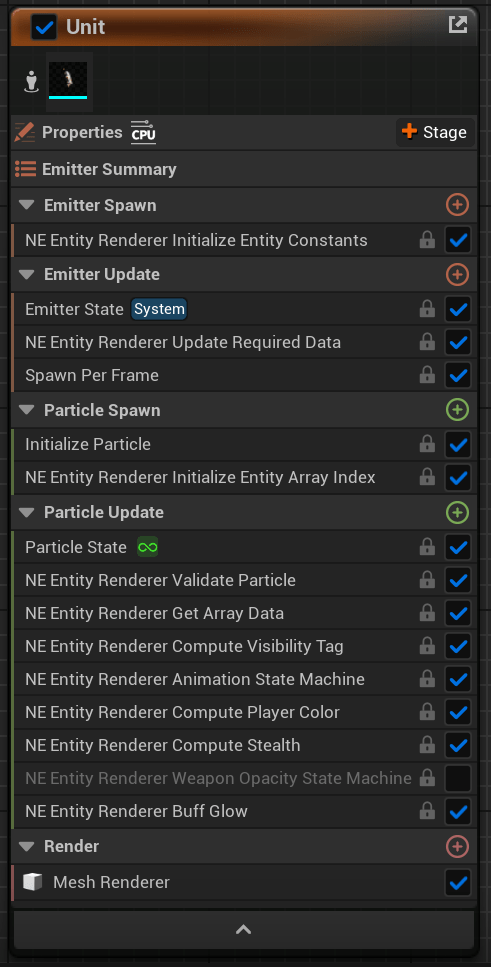
The Niagara emitter for one of the units using this rendering path
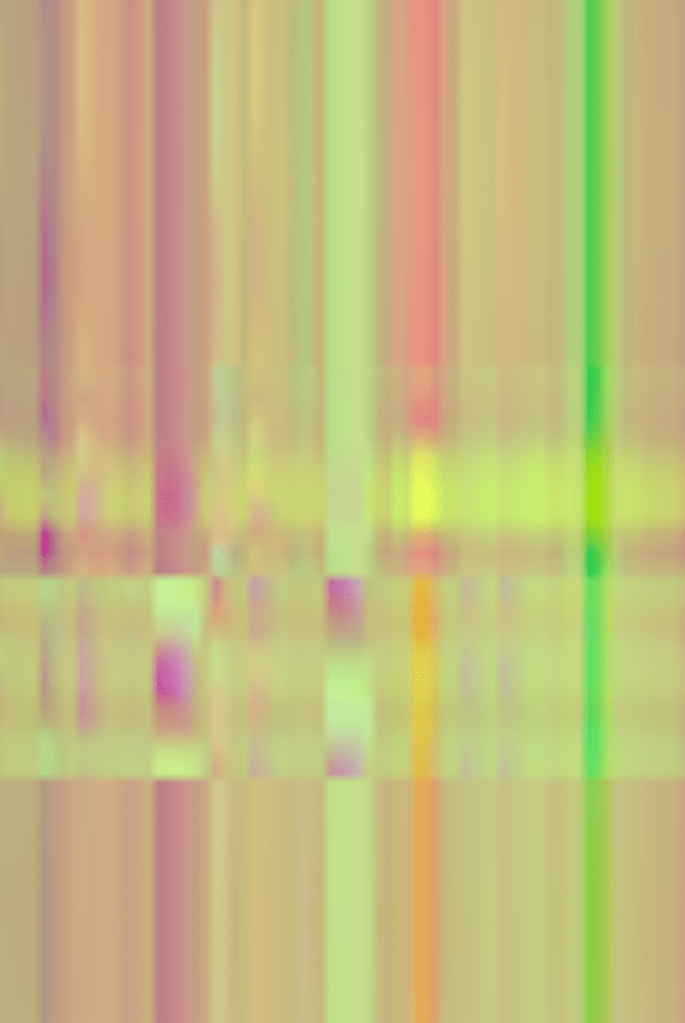
Example of a VAT where the position of each joint is encoded for each frame of animation
In game we spawn a Niagara system per skeletal mesh, send updates every frame right after position/ animation state is computed based on game logic to keep the visuals in sync. Under the hood there is also a lot of additional management work being done at runtime to remove units that are no longer in play, recycle IDs, add new units, etc.
The particles (units) evaluate their state based on the updated data and blend between several looping or one off animations.
The vertex shader is always evaluating 2 animation states and blending between them. The particle payload sent to shader via DynamicParameters consists of 3 floats (actually 6, since we need previous frame data for accurate motion vectors):
- Animation A Normalized Time
- Animation B Normalized Time
- Animation Blend
A tricky bit was solving the edge case when the state calls for more than 2 animations being evaluated at any given time, for example when a unit is transitioning from move to idle, but then attacks in the middle of that transition. Thankfully the animations are pretty quick and snappy, so we simply skip the less important transition – snap to idle and play the attack.
Losing out on animation notifies was a tad cumbersome – those are often used to trigger certain cosmetic VFX when a unit attacks for example. Leveraging Niagara Data Channels I sent data from the units based on their state to other Niagara systems to spawn other particles and replicate that functionality quite well.
Lifebars
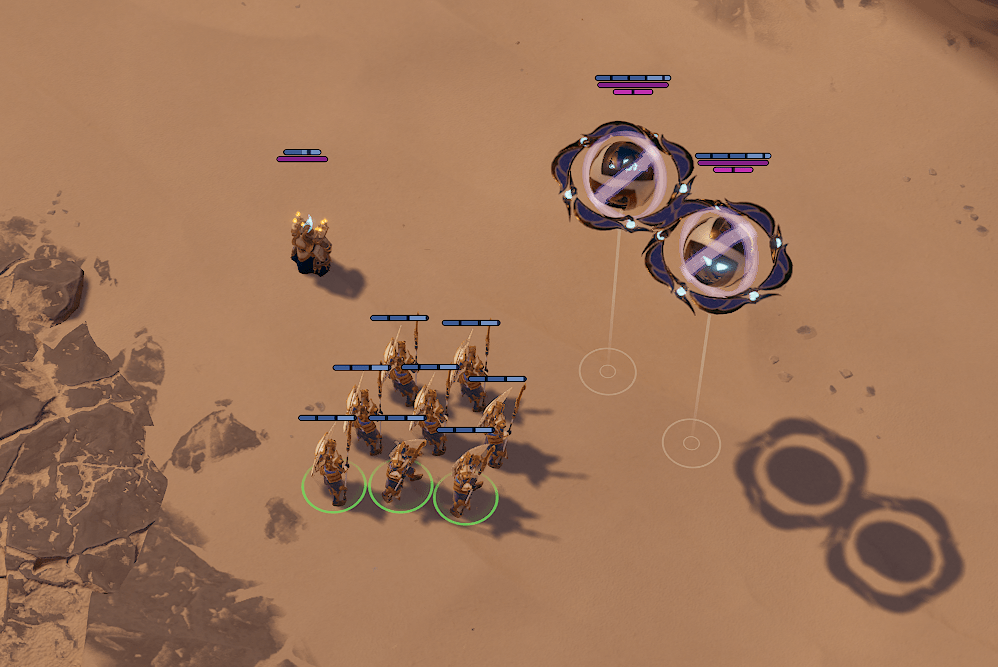
Lifebars/ manabars, which hover over every unit and structure in the game, had a similar issue of massive per instance overhead. The initial naive implementation of lifebars was done by attaching widget components to the units – a solution that was never built to scale.
There are ways to make many individual Slate widgets perform well and still have full functionality – the Lyra sample has a great implementation called the Indicator Manager, but in our case the lifebars were simple enough that they could just be a single screen facing sprite per bar.
Since I had already done the legwork render units in big batches via Niagara, carrying that work over to lifebars was quite easy.
A few notes about rendering UI elements outside of Slate:
- You will now be working with the UI elements in worldspace to start with so scaling them to the right size is up to you now
- You will now be rendering at the rendering resolution, not necessarily your monitors resolution, so a pixel perfect result is unlikely (unless you can guarantee the end users’ display resolution and rendering resolution… maybe it could work)
- Rendering as a masked material will have you writing to depth as well, so depth of field, temporal AA, depth testing and all sorts of other things will mess with it – probably not advisable in most cases
- If you render it as a translucent material before or after DOF, it is likely to get mangled by temporal AA and motion blur if those are enabled
- In all of these cases you will be dealing with the UI being composited before tonemapping, so post processing will affect the UI. This can be a dealbreaker. Eye adaptation can be cancelled out using the EyeAdaptationInverse node in the material graph.
Abandoned Unit Rendering Ideas
- Potential optimization – only evaluate 2 animations in the vertex shader if we detect that we need to blend between different animations.
- Static branching would require more asset management and create too many shaders.
- Dynamic branching would work better, but necessitate recreating the functionality inside a custom HLSL block, which is a lot of additional work. Might be worth it but… We’re game thread bound in scenarios where this would show up in profiling anyway.
- Sparse updates were briefly considered, but after moving most of the relevant state out of the AActors and into the ECS registry, the gathering of data became blazing fast anyway. Pushing arrays into Niagara also is not even close to being a problem at the scale of hundreds.
- Most animations look not half bad having only 8bit precision for the animation textures. Could be a viable option if bandwidth was a bottleneck for lower end GPUs. Abandoned since it didn’t make enough of a difference in our case, and presented problems where even a single animation in a units move set would eat up most of the range available in the texture, so all the others would suffer. There are ways around this, but none that seemed worth the effort.
 Ignas Klydžia